👍
Inhalte können einfach von Obsidian zu einem Ghost-Blog übertragen werden. Schwierig wird es bei zweispaltigem Layout oder bei eingebetteten pdf-Dokumenten. Dazu hier einige Tipps:
- Inhalte übertragen
- Darstellung in Spalten
- pdf-Dokumente einbetten
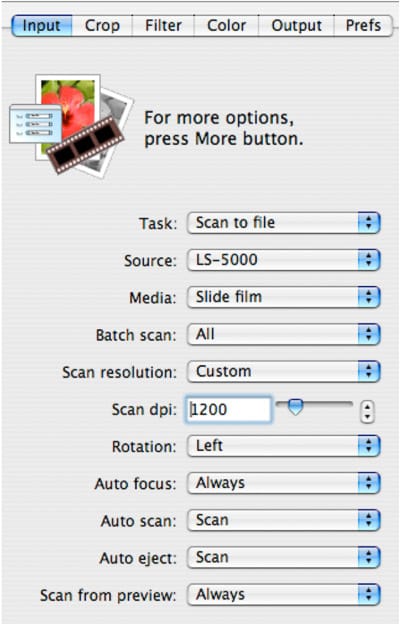
Vintage: Anleitung zum Diascannen aus dem Jahr 2005. Darstellung in Spalten
Inhalte übertragen von Obsidian zu Ghost
- Inhalt auswählen
- Via Command / Copy as hmtl kopieren,
so wird die Markdown-Formatierung erhalten - Ghost Blog öffnen und einfügen
Darstellung in Spalten
Titel
|
|
Obsidian
- Frontmatter zuoberst im Dokument
---
cssclasses:
  - spalten
---- Darstellung / CSS-Bausteine, neue Datei 'tabelle.css' anlegen
- .obsidian/snippets/tabelle.css
/* Kompakter Modus für Überschriften und Listen in Tabellen */

/* 1. Entfernt Abstände für H1 bis H6 in Tabellen */
table h1, table h2, table h3, table h4, table h5, table h6 {
    margin-top: 0 !important;
    margin-bottom: 0 !important;
    padding-top: 0 !important;
    padding-bottom: 0 !important;
}
/* 2. Entfernt Abstände für Listen (ul, ol) in Tabellen */
table ul, table ol {
    margin-top: 0 !important;
    margin-bottom: 0 !important;
    padding-top: 0 !important;
    padding-bottom: 0 !important;
}
/* 3. Entfernt Abstände für einzelne Listenpunkte, damit sie enger stehen */
table li {
    margin-top: 0 !important;
    margin-bottom: 0 !important;
}
/* 4. Verhindert den Standard-Abstand des letzten Elements in einer Zelle */
table td > *:last-child {
    margin-bottom: 0 !important;
}
/* 5. Verhindert den Standard-Abstand des ersten Elements in einer Zelle */
table td > *:first-child {
    margin-top: 0 !important;
}

/* Definition der Spaltenbreite (50/50 Split) */
.spalten td {
    width: 50% !important;
    vertical-align: top !important; /* Text beginnt immer oben, auch bei kurzen Zeilen */
    padding-right: 20px !important;
}

/* Rahmenlose und abstandsfreie Tabellen */
.spalten table {
    border-collapse: collapse !important;
    border: none !important;
    margin: 0 !important;
    padding: 0 !important;
    width: 100% !important;
}
.spalten td,
.spalten th,
.spalten tr {
    border: none !important;
    padding: 0 !important; /* Entfernt den inneren Abstand der Zellen */
    margin: 0 !important;
}
/* Optional: Ein kleiner Abstand zwischen den Spalten (Gap-Ersatz) */
.spalten td {
    padding-right: 20px !important;
}
.spalten td:last-child {
    padding-right: 0 !important;
}
Beispiel einer Obsidian Tabelle zur Darstellung in Spalten
| <h3>Titel</h3>                  |                               |
| ------------------------------- | :-----------------------------|
| !2026.01.29_dia_scannen_02a.jpg | <ul><li>Erste Zeile           |
                                    <li>Zweite Zeile</ul>
Ghost
- CSS mit Code-Injection im Header des Posts
<style>
  /* Spezifische Korrekturen für die Ghost-Tabelle */
  .ghost-custom-table {
    width: 100% !important;
    border-collapse: collapse !important;
    border: none !important;
    background-color: transparent !important;
    margin: 20px 0 !important;
  }
  .ghost-custom-table tr,
  .ghost-custom-table td,
  .ghost-custom-table th {
    border: none !important;
    background-color: transparent !important;
    background: none !important;
    padding: 0 !important;
    vertical-align: top !important; /* Richtet Text oben bündig zum Bild aus */
    text-align: left !important;
    box-shadow: none !important;
  }
  .ghost-custom-table th {
    padding-bottom: 15px !important;
  }
  .ghost-custom-table td:first-child {
    width: 300px; /* Breite der Bildspalte */
    padding-right: 25px !important; /* Abstand zwischen Bild und Text */
  }
  /* Listen-Korrektur innerhalb der Tabelle */
  .ghost-custom-table ul {
    margin: 0 !important;
    padding-left: 1.2em !important;
    list-style-type: disc !important;
  }
  .ghost-custom-table li {
    margin-bottom: 8px !important;
    line-height: 1.4 !important;
  }
  /* Responsive Fix: Auf Handys untereinander stapeln */
  @media (max-width: 600px) {
    .ghost-custom-table td {
      display: block !important;
      width: 100% !important;
      padding-right: 0 !important;
      margin-bottom: 20px !important;
    }
  }
</style>- Tabelle mit einem html-Block erstellen
<table class="ghost-custom-table">
  <tbody>
    <tr>
        <h3 style="margin: 0;">Titel</h3>
    </tr>
    <tr>
      <td>
        <img src="https://supportnet.ch/content/images/2026/01/bild01.jpg"
             style="width: 100%; max-width: 300px; height: auto;
                    display: block;">
      </td>
      <td>
        <ul>
          <li>Erste Zeile</li>
          <li>Zweite Zeile</li>
        </ul>
      </td>
    </tr>
  </tbody>
</table>
pdf-Dokumente einbetten
Obsidian
- Drag&Drop
- Dokument wird in den definierten Assets-Ordner importiert
- Automatische Einbettung, kein Code nötig
Ghost Blog
- Dokument hochladen mit
/file-Kommando - Bildadresse auslesen im Preview-Mode mit Kontextmenü/Bildadresse kopieren
- Einbetten mit iframe in einem html-Block
<p>
  <iframe
   src="https://supportnet.ch/content/files/2026/01/anleitung.pdf"
    style="width:100%; max-width:900px; height:1050px;
           border-radius: 4px; border: none;"
    loading="lazy">
  </iframe>
</p>